

I've seen so many people hit the same roadblock, and it usually plays out in a familiar way.
You create your first real automation, maybe it’s a Zap, a Make scenario, or an n8n flow. It works like a charm, and you’re on cloud nine. But then, out of nowhere, it runs when it shouldn't. It sends an email to a customer, but oops, it uses the wrong name. Or it posts some AI-generated content that’s just plain off.
Maybe it moves a deal to the wrong stage in your CRM, or worse, it spends money you never intended to spend.
The tricky part? The automation didn’t fail. It did exactly what you programmed it to do. It just happened so quickly that you couldn’t hit the brakes in time.
What you really want next is pretty straightforward. You don’t want to scrap the whole thing.
You’re looking for that one moment, right before the risky action, where a person can click Approve or Reject. In Slack, or your inbox, where you’re already hanging out.
Here’s the silver lining: this has a name. The pros use it all the time, and the best part?
You don’t need to write a single line of code to set it up.
Let me show you how.
What is a human approval step in an automation?
Well, it’s like hitting the brakes just before making a big move.
This step is a thoughtful pause you insert into the automation process, right before it takes a potentially risky action.
When the automation hits that point, it stops and sends you a notification detailing what it’s about to do. It will only proceed if you give the green light. If you choose to reject it or simply ignore it, that action won’t happen at all.
Typically, an automation runs smoothly from start to finish without anyone keeping an eye on it. But an approval step interrupts that flow. Before any significant action is taken, it waits for a human to say “yes.”
Think of it like the spell-check feature in your email app. It doesn’t stop you from sending an email just because it finds a typo; instead, it highlights the mistake and lets you decide what to do.
An approval step works in a similar way for those crucial actions.
Engineers refer to this as human-in-the-loop. You don’t need to remember the jargon; just picture it as a moment of pause, a clear “are you sure?”, and a button to click.
Why does an automation need a human approval step?
Well, automation does exactly what you program it to do, and that includes making mistakes at full speed, all in your name. If the instructions are even slightly off or the data is flawed, there’s no one to catch those errors before they reach a customer. That’s where the approval step comes in as a safety net.
Take Air Canada’s customer-service chatbot as a clear example. It mistakenly informed a grieving passenger that he could retroactively claim a bereavement fare. That was incorrect. In 2024, Canada’s Civil Resolution Tribunal (2024 BCCRT 149) found the airline responsible and ordered it to pay CAN$812.02. The tribunal member made it clear: it doesn’t matter if the information comes from a static webpage or a chatbot. ( CBS News )
The takeaway for anyone just starting out is straightforward. If your automation is communicating with customers on your behalf, you’re accountable for whatever it says.
Trust is another crucial factor. According to a 2025 Pew Research Center survey of 5,023 US adults, 50% expressed more concern than excitement about AI in their daily lives, a jump from 37% in 2021. (Pew Research Center)
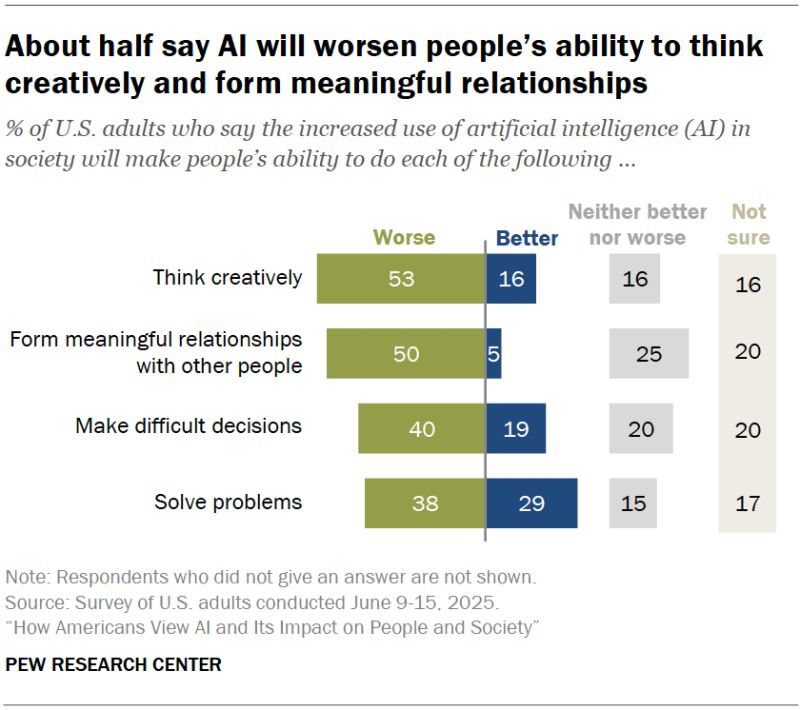
One visible mistake can reinforce that anxiety, while one quiet approval step can help prevent it.
Which steps should pause for a human, and which should just run?
Here’s where many folks tend to overdo it.
After just one scare, they feel the need to approve everything. But don’t do that.
When you approve every single run, you stop paying attention. You just hit yes without thinking. That’s actually worse than not checking at all.
You might feel secure, but you’ve stopped being vigilant. (There’s research on this that you can check out here. People end up trusting the machine too much and let bad things slip through.)
Ask two questions. Can you undo it in under a minute? Will someone outside your team see it?
Keep this grid where you'll see it:
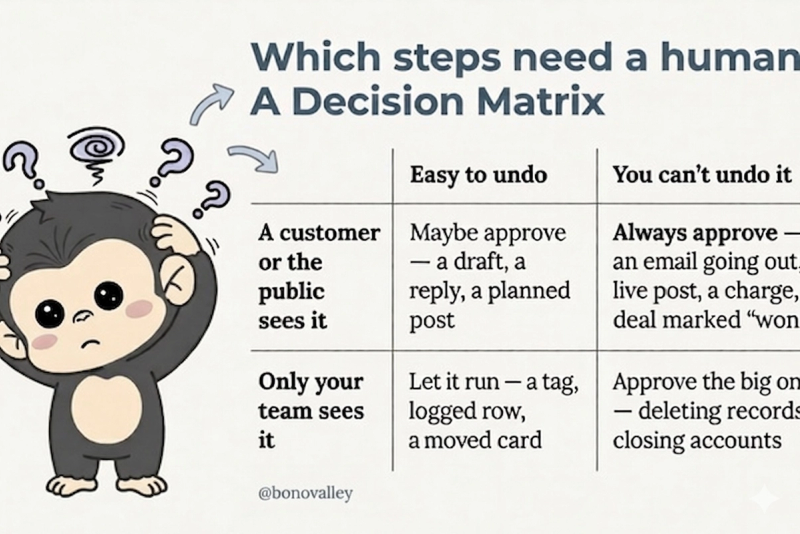
The top-right box is the one that can really cause problems. If you’re going to protect one corner, make sure it’s that one.
How do you decide if a single step needs approval?
Run the step through six yes/no questions and count the yeses. Three or more, pause it for a human. Two or fewer, let it run. The questions cover the main ways an automated action can hurt you.
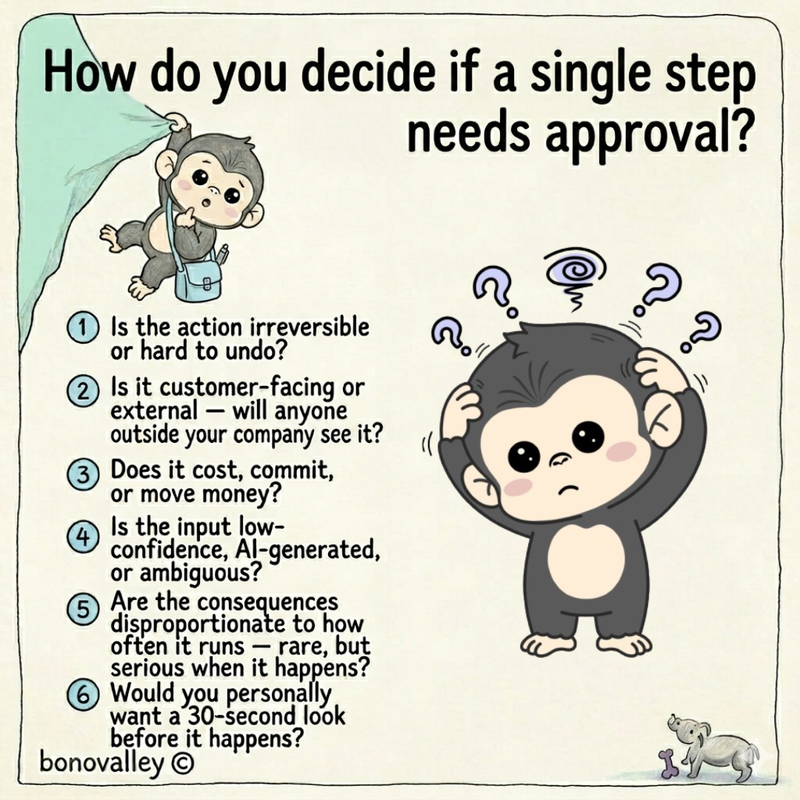
Or hold the whole thing in one sentence: pause the step when it's irreversible and it's either customer-facing, costs money, or runs on low-confidence data. Otherwise, let it run.
How do you add a human approval step without code?
The buttons have different names in each tool. The steps are the same. Here's what I'd do.
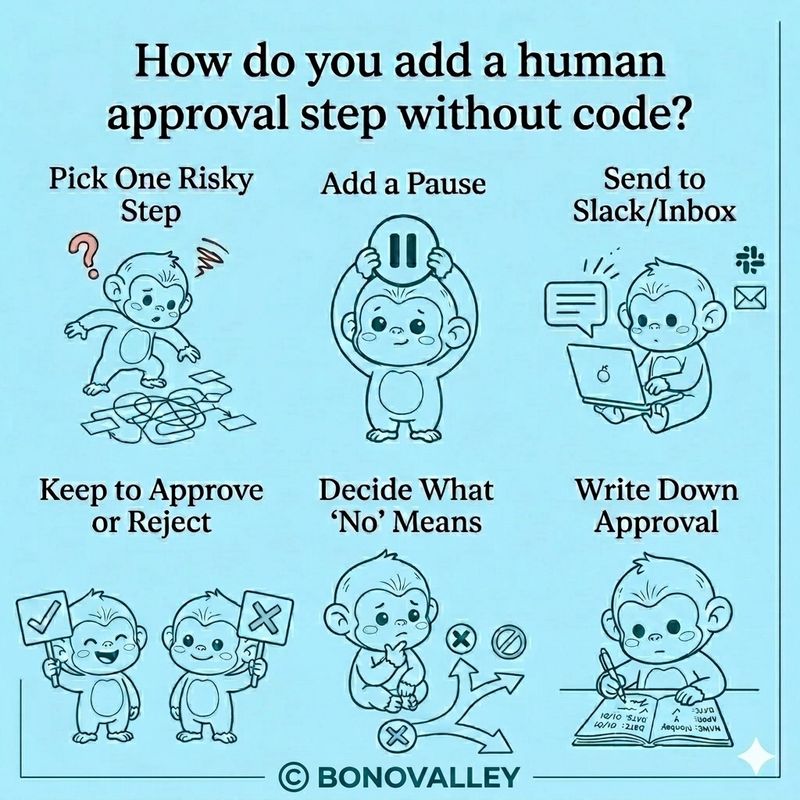
1. Pick one risky step. Just one. The action that would cost you money or embarrass you. Leave the rest for now.
2. Add a pause before it. Look for a step called "wait," "delay until," or "send and wait for response." That pause is the whole trick. Without it, the flow runs past you before you can answer.
3. Send the question to Slack or your inbox. Don't make yourself log in to approve things. You won't keep it up. Send it where you already are. Put it all in the message: what it's about to do, the details, and two buttons.
4. Keep it to Approve or Reject. Two choices. Not five. Buttons in Slack, or a yes/no in your inbox, wired back to the flow. (The part that sends your click back is called a webhook. Think of it as a doorbell.)
5. Decide what "no" means. And what silence means. If you reject it, where does it go? Dropped, or to a list you handle by hand? And if you don't reply in a few hours? For anything that reaches a customer or spends money, the safe default is this: do nothing, and remind me. Never let it run on its own.
6. Write down who approved what. One line in a sheet. When, what, who, and what happened. It's boring. Until the day something breaks and you need to know if a human said yes.
What should you do if no one responds to the approval request?
Start by setting a timeout from the very beginning and determine what actions to take when that time runs out.
For anything that involves customers or financial transactions, it's best to play it safe: if there’s no response within a few hours, just hold off and let someone know.
For less critical actions that can be easily reversed, you might choose to let things move forward.
The real risk comes from having no timeout at all, this is how automations can get stuck without anyone noticing, or run in the background without oversight.
What's the most common mistake beginners make?
They approve everything. Once an automation starts asking for a yes every time, you stop paying attention and just click yes out of habit. In doing so, you’ve recreated the manual tasks you were trying to avoid, all while feeling falsely secure.
This phenomenon is known in human-factors research as automation bias . A key study by Parasuraman and Manzey (2010) in Human Factors revealed that automation bias can lead to both missed opportunities and errors when decision-making tools aren’t perfect. In simpler terms, when you place too much trust in the system, you overlook its mistakes and allow things to pass that shouldn’t.
The solution is to exercise restraint. Carefully monitor the few steps where a mistake could have serious consequences, and let the rest go. An approval step that you actually take the time to read is far more valuable than ten that you just stamp without a second thought.
Start smaller than you think
If there's one piece of advice I want you to take away from me, it's this:
Try adding just one check to your routine this week. Keep an eye on it for a bit. If you feel it's necessary, consider adding a second one next month.
The goal here isn't to slow you down; it's about keeping that one choice in your hands.
The same idea applies to much more sophisticated systems.
Independent AI researcher Simon Willison has pointed out that coding agents often default to seeking human approval before executing nearly every command. Turning this feature off can be quite risky. ( Designing agentic loops )
Cassie Kozyrkov, who led decision science at Google, put it perfectly.
She said, "AI is a tool. It can't take responsibility for itself."
Read more: What AI means for leadership
Your automation can handle the tasks, but it can't claim the outcome.
That responsibility still lies with you. You’re the one standing at the door that AI can’t open twice. It’s up to you to decide if you’ll let it in.