

Imagine this. A small business owner clicks "Go live” on her brand new automation.
It's Friday afternoon. She has been building this thing for three weeks. The automation is supposed to send her customers a thank-you email the moment they pay her.
She turns it on. She tests it once. The email arrives. She closes her laptop. She goes home.
By Monday morning, forty-three customers had paid her over the weekend. None of them got the email. Not one. The webhook fired every time. It just arrived at the address.
She had tested the URL.
This post will help you not be her. We will walk through how to test a webhook before you go live, the one free tool every beginner should know about and the four mistakes that cause most "it worked yesterday" disasters.
Why testing a webhook matters more than you think
A webhook is a message that one app sends to another the moment something happens. A customer pays. A form gets filled. A new lead lands. The webhook carries the news.
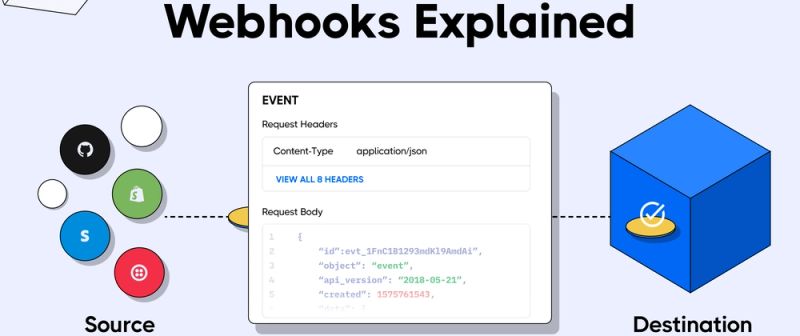
When it works, it feels like magic. When it fails, it fails silently. No error pops up. No alarm goes off. Your flow sits there doing nothing while the world moves on without it.
That's the problem. A broken webhook does not scream. It whispers.. By the time you notice the whisper, you have lost real customers, real money or real trust.
So you test. Properly. Before you go live. That's what this post will teach you.
The Three Things You're Testing
Most beginners think "testing a webhook" means one thing. It's three things. They fail in different places.
- Does the webhook fire? When the event happens in App A, does App A send the message?
- Does the message arrive? Does it reach the address you gave it?
- Does your flow do the thing with it? Once the message lands, does your automation read it correctly? Take the right action?
You have to test all three. Skip one. The failure hides until a real customer pays the price.
Think of it like a relay race. Runner one starts. Runner two catches the baton. Runner three crosses the finish line. If any runner drops the baton, the team loses. You are checking each handoff before race day.
Meet Webhook. site, the free tool that fixes most testing pain
Before you test anything in your real automation tool, you need a way to see what a webhook looks like inside. That's what Webhook. site is for.
Go to webhook.site. It opens. You'll see a long URL at the top of the page. That URL is yours. You didn't sign up. You didn't pay. You just opened the page, and the URL exists.
Copy that URL. Paste it into App A's webhook settings as the destination. Trigger your event in App A. Watch the Webhook.site page.
Within a second or two, a new entry shows up. Click it. You'll see every detail App A sent. Every field. Every value. The whole message, laid out in plain text.
That's it. That's the whole tool. It costs nothing and it solves the biggest beginner problem: not knowing what a webhook holds until you can see one.
How to use Webhook.site, step by step
Open a browser tab. Go to webhook.site. The page loads. You're done with setup.
Look at the top of the page. You'll see a URL that starts with https://webhook.site/ followed by random characters. That's your testing address. Click the copy button next to it.
Open App A's settings. Find the webhook section. Different apps call it different things. Look for Webhooks, Outgoing webhooks, Integrations, or Developer. Paste the URL you copied as the destination.
Tell App A which event should trigger the webhook. New order. New form submission. New customer. Whatever fits your real automation.
Save the settings. Then trigger the event for real. Place a fake order. Fill in your own form. Add a test customer.
Go back to the Webhook.site tab. A new entry appears in the list on the left. Click it. You'll see three sections.
- Headers show you who sent the message and how.
- Body shows you the actual data. This is the bit that matters.
- Raw content shows you the unprocessed version, useful when something looks off.
Copy the body. That's what your real automation tool will receive. Now you know every field to look for, what they're named, and what kind of values they hold.
One thing to know: a Webhook.site URL stays alive for seven days for free. After that, it disappears. If you need a permanent URL, the paid plan keeps one alive forever. For most beginners, the free version is all you'll ever need.
The four mistakes that cause most webhook disasters
Now you have the tool. Here are the four traps that catch beginners, even ones who tested carefully.
Mistake one: testing the wrong URL
Most automation tools give you two URLs. A test URL for while you're building. A production URL for when you go live. They look almost identical. They're not the same.
The small business owner at the top of this post pasted her test URL into Stripe. It worked once during her test. Then she switched her automation to "live" inside her no-code tool. The test URL stopped listening. Stripe kept sending webhooks to it anyway, because she never updated Stripe's settings. Every webhook landed in a black hole.
To avoid this: when you switch your automation from "test mode" to "live," check the URL in App A's settings immediately. If it still says "test" in the URL, you have a problem.
Mistake two: the message shape changed and nobody told you
App A's webhook sends fields like customer_email and order_total. You build your flow around those names. Six months later, App A updates and starts sending email and total instead. Your flow looks for the old names. It finds nothing. The webhook fires fine. Your flow just does nothing with it.
To avoid this, save a copy of one good webhook payload as a reference. When something stops working, compare the new payload to the old one. Look for renamed or missing fields. This catches most "it worked yesterday" failures.
Mistake three: the webhook fired but never arrived
Sometimes App A sends the webhook. Your endpoint never receives it. The webhook gets lost in the middle.
Three things cause this. Your endpoint went down for a minute. A firewall blocked the request. Or App A retired for a while, gave up, and moved on.
To avoid this: pick a source app that retries. Stripe retries for three days. GitHub gives up in about thirty seconds. Know which one you're working with. And for high-value events, set up a daily check that compares what App A sent to what your flow received. The gap is the problem.
Mistake four: the signature failed
Some apps sign their webhooks with a secret code. It proves the message is real and not someone pretending to be App A. If you set the secret in one place but not the other, your tool rejects every message as fake.
To avoid this: when an app offers signature checking, set the secret on both sides. The same string. Letter for letter. Then send a test webhook and confirm your tool accepts it. If it doesn't, the secret is wrong somewhere.
Testing inside your no-code tool
Webhook.site is for seeing the message. Your no-code tool also has built-in test buttons. Use both.
In Zapier, click "Test trigger" on the webhook step. Zapier waits for a webhook, catches the next one that arrives, and shows you the data. Don't skip this. Zapier uses the data from your test to build the rest of the flow. If your test webhook is weird, your whole flow gets weird.
In Make, run the scenario once and trigger a real webhook from App A. Make catches the data and lets you map fields visually. If a field shows up empty or missing, fix it now, not after you go live.
In n8n, use "Listen for Test Event" on the webhook node. Trigger the event in App A. n8n catches the webhook and shows you the data. Same idea. Same outcome.
All three tools have a critical detail you must not miss. The test webhook URL and the live webhook URL are different. The test URL works only while you're listening. The live URL works once your automation is active. Switching between them is where mistake one happens.
A simple testing checklist by build size
Not every webhook needs the same level of testing. Match the depth to the stakes.
For a one-off simple flow (sends you a Slack message when something happens):
- Test the source app fires the webhook (Webhook.site catches it)
- Test the flow runs end to end with one real event
- Done
For a customer-facing flow (sends a thank-you email, updates a customer record):
- Everything above
- Save a sample payload as a reference
- Add a logging step that writes every webhook to a sheet for the first week
- Set up a notification when the flow fails
For a money-moving flow (charges a card, refunds a customer, books an invoice):
- Everything above
- Send the same webhook twice. Make sure your flow handles duplicates safely
- Add a human approval step (link-to-human-approval-step-blog) before any irreversible action
- Run a daily check that compares what App A sent to what your flow processed
The last category is where small mistakes become public mistakes. Test more. Approve more. Trust nothing.
What would a senior engineer tell you?
Charity Majors runs an observability company called Honeycomb. She's spent her career watching production systems fail in ways nobody predicted. Her shorthand for it: "You don't really know what your system does until you've tested it in production."
That sounds defeatist. It isn't. It's a warning that no amount of testing in a safe environment catches everything. Your real customers will surface edge cases your test webhooks never imagined. The point of testing before you go live isn't to catch every failure. It's to catch the ones that would burn you.
For deeper dives, see how to use webhooks for the full beginner introduction. And webhook vs API vs polling, if you're not sure a webhook is the right choice in the first place.
freeCodeCamp has a free two-hour course called "Webhooks for Beginners" by Craig Dennis. It walks you through the basics with a working example. Two hours, no fluff. Worth the watch if you want one more pass at the concept before you build.
The bit nobody tells you
The hardest part of webhook testing isn't the tool. It's the discipline.
Every beginner is tempted to skip the test because the build worked once, and they're tired. That's how Friday-afternoon launches turn into Monday-morning panic. The fifteen minutes you spend in Webhook.site before going live, save you the four hours of recovery you'd spend after.
Build it. Test it on Webhook.site. Test it in your no-code tool. Trigger a real event. Watch the payload. Send the same event twice. Then switch to the live URL and go.
That's it. That's the whole post.