

Let me be real with you. The first time I heard someone in a meeting say, "We’ll just hit their API for that," I nodded along like I knew what they were talking about, all while secretly Googling "API" under the table.
I’m sharing this because if you’re reading this, chances are you’ve been in a similar boat.
Maybe you’re a marketer who keeps hearing about "connecting Salesforce to HubSpot." Or perhaps you’re in operations, handed a no-code subscription with a vague task. Maybe you’re a solo founder whose investor casually mentioned being "API-first," and you’ve been too shy to ask what that even means.
Let me assure you, you’re not alone. Developer documentation can be a maze, especially for those who aren’t developers. It’s not your fault; that kind of writing often misses the mark for people like us.
So, this post is the guide I wish I had. No coding jargon. No assumptions about what you already know. Just you and a topic that’s actually a lot simpler than the internet would have you believe.
Quick version up top, because I respect your time:
- An API is the way one app asks another app for something. That's it. The rest are details.
- You're already using them. Every "Connect your Gmail" button you've ever clicked is an API call wearing a costume.
- You probably don't need to learn the technical bits. Unless your no-code tool can't do what you need, then come back here.
If that's enough for you, you can leave now. If you want the longer version with all the bits that suddenly made sense to me, keep reading.
So what is an API, really?
API stands for application programming interface. I’m mentioning that here because it’s necessary, not because it’s particularly enlightening. Honestly, when you break it down, that acronym doesn’t really clarify much at all. So, let’s just move on.
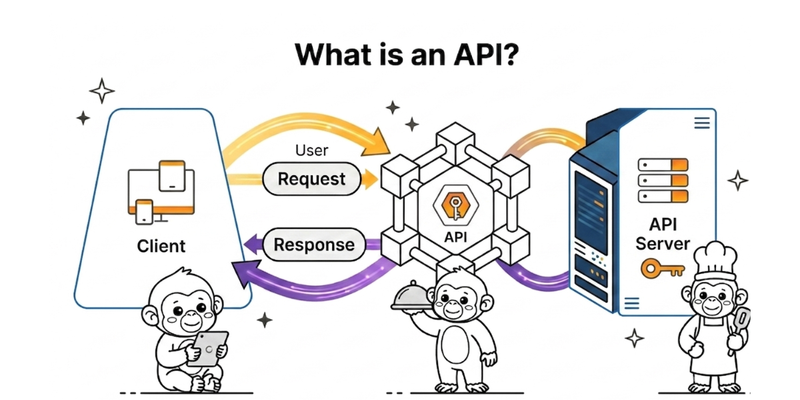
An API is simply the agreed-upon method for two applications to communicate. One app requests something specific, and the other app responds with a clear answer. They both stick to a set of rules to ensure that their conversation doesn’t go haywire if one of them decides to change things up next Tuesday.
That’s the whole idea, really. Everything else in this post is just extra detail.
And about those "agreed rules", they’re more important than they might seem. This is what makes APIs dependable, unlike, say, scraping a website, which can be a total mess. When Gmail updates its inbox, your "send an email" automation keeps working because the API behind it remains stable.
But if Gmail changes its API?
That’s when things start to break, and you can bet the entire developer community has a mini-meltdown on Twitter. (By the way, Stripe has hardly changed its API since 2011. Seriously, that’s not a typo—fifteen years!)
You're already using them. I promise.
This is the lesson I had to learn the hard way, and it really shifts how the rest of this post comes together.
Every time you've clicked "Connect your Gmail" in Zapier, or "Add Stripe" in Make, or selected an app from a dropdown in any no-code tool, you've actually interacted with an API. Yes, you did it. No coding required.
The tool is essentially making the same API call that a developer would, but it’s cleverly hiding all the technical stuff behind a button, a friendly icon, and a soothing colour scheme.
Honestly, when this realisation hit me, I felt a bit betrayed. All those neat little tiles in my Zaps were just API calls in disguise? Absolutely. They still are. Welcome to the club!
But here's the good news: this understanding does two really helpful things for your mindset.
First, you stop being puzzled when a connector "can't" perform an action that the app claims to support; usually, it’s because the underlying API doesn’t allow for that action, and the no-code tool is just being upfront about its limitations, not slacking off.
Second, you begin to recognise when your no-code tool is the real bottleneck instead of the platform you’re trying to connect with.
That second insight is the real game-changer. It’s worth more than everything else in this post.
How it actually works. Three steps. Done.
I'm going to keep this part short, because it's actually short.
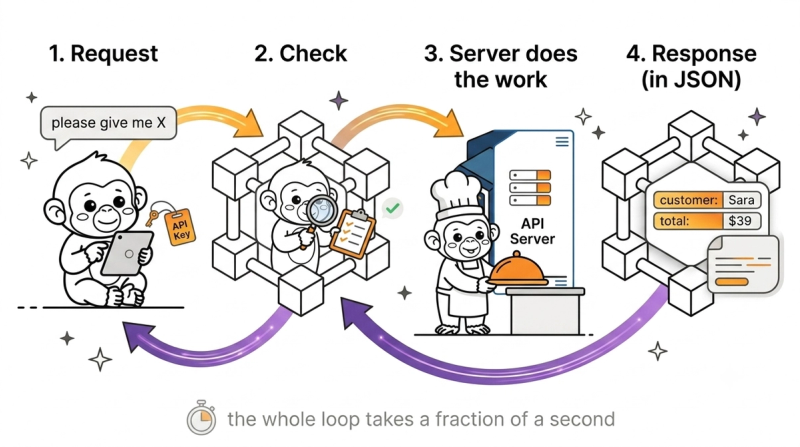
You send a request. It says what you want and proves who you are. The other app checks the request and does the thing, or politely refuses if you're not allowed. The other app sends a response back. The response usually arrives in a format called JSON, which is a tidy way of writing data down so any tool can read it.
The whole loop takes a fraction of a second. You don't see it. But every "instant" feature you've ever loved in a no-code tool is this exact thing, firing thousands of times a day, on your behalf.
That's the entire mechanism. I was waiting for it to be more complicated than that for years. It isn't.
The restaurant analogy, briefly, because everyone uses it
You sit down at a restaurant. A waiter hands you a menu. You order. The waiter takes the order to the kitchen, the kitchen makes the food, and the waiter brings it back. You never go into the kitchen. The chef never visits your table. You can only order from the menu.
The waiter is the API. The menu is the documentation of what you're allowed to order. The kitchen is the other app's database and servers. If you ask for something off-menu, the waiter says no, politely, in the form of an error code, and the kitchen stays safe.
I know. Every API blog uses this one. There's a reason — it works.
(A real waiter, of course, would absolutely bring you toast if you asked nicely. An API will not. Don't take the metaphor too far. It's a metaphor.)
The vocabulary you'll bump into
Right. We have to do the jargon section. I'll keep it short.
API key. A long string of random characters that proves the request is from you. Treat it like a password. Don't paste it into screenshots, Slack messages, or anywhere a stranger might see it.
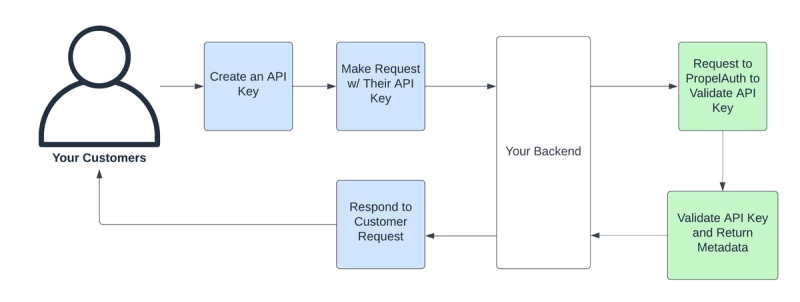
(I once watched someone share their API key in a Loom video. The cleanup took a weekend.) You'll usually find it in an app's settings under Developer, API, or Integrations.
Endpoint. A specific web address inside the API.
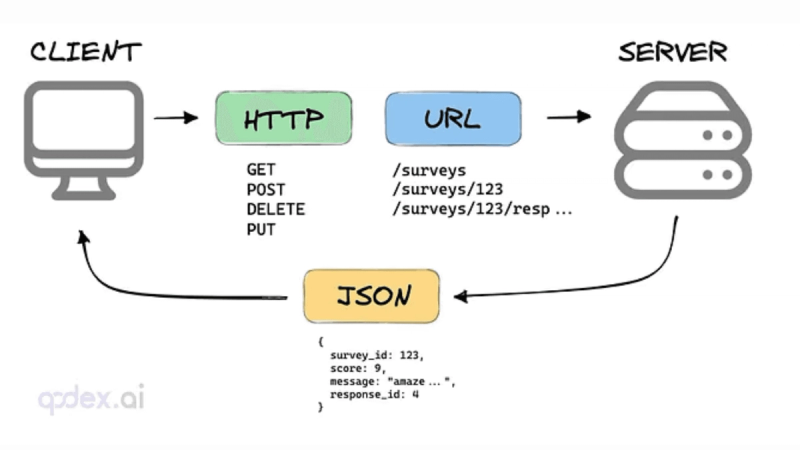
Each endpoint does one thing: list customers, create an invoice, delete a record. The Gmail API has dozens of them. You only ever need the one for the thing you're doing.
Request method. The verb. Four exist:
GET (give me data), POST (add new data), PUT (update existing data), DELETE (you can probably guess this one).
Most public APIs only let strangers do GET, because they don't trust the rest of us to write to their database. Reasonable of them.
Status code. A three-digit number that comes back with every response. 2-something means it worked. 4-something means you messed up (wrong key, wrong URL, asking for something that doesn't exist). 5-something means the server messed up, which is rare and not your fault — although you'll still spend an hour assuming it is.
REST, GraphQL, SOAP. Three different styles of API. REST is what about 90% of modern apps use. GraphQL is newer and lets you ask for exactly the data shape you want. SOAP is old, complex, and you'll probably never meet it unless you work with a bank or an insurance company. Don't memorise the differences. Just know the words exist so you don't panic when you see them in documentation.
That's the vocabulary. Genuinely. There isn't more.
How to actually use one. Without writing code.
There are three steps. Then a fourth one I'd add only after a lot of watching beginners trip over the same thing.
1. Find the documentation. Read only the Quick Start. Look for a section called Quick Start, Getting Started, or sometimes just Introduction. Every decent API has one. It is not the reference manual. The reference manual is an encyclopedia, and you do not need it yet. The Quick Start is the guided tour. Read that. Read nothing else until the Quick Start makes sense.
A specific tip I'd add here, because nobody puts this in beginner posts: search the Quick Start page for the word "curl." The curl example is the simplest possible version of a request, and you can paste it straight into a free testing tool (more on that in step 2) and see what comes back. It's the fastest way I know to find out what the API actually does versus what the marketing copy claims.
2. Test it outside your automation tool first. Use Postman, Hoppscotch, or ReqBin. They're free. They run in your browser. They let you paste a request, hit send, and see exactly what comes back. Ten minutes of doing this beats an hour of reading documentation, every single time. You'll learn what the data looks like, what the error messages mean, what fields exist — and you'll need all of that before you build anything in your no-code tool.
3. Get the API key. It lives in the app's settings, usually under Developer, API, or Integrations. Copy it once, paste it into a password manager, and never look at it again.
(Or, more realistically, copy it, paste it into an unmarked text file on your desktop, lose track of which app it belongs to within a fortnight, and have to regenerate it. We've all been there. Use a password manager.)
4. Wire it into your no-code tool. If your tool has a connector for the app, use that. The connector handles authentication and request formatting for you, and you should always prefer it. If your tool doesn't have a connector, look for a generic step called something like HTTP Request, Webhooks, or Custom API Call. Feed it the URL, the method, and the headers from the documentation. Your no-code tool does the rest.
That's the whole process. The first time, it'll take an afternoon. The second time, twenty minutes. By the fifth time, you'll be doing it without thinking, and you'll wonder what the fuss was about.
Should you actually bother learning this?
Honestly? Mostly no.
The whole point of a no-code tool is to hide APIs from you. If a Zapier connector exists for the app you need, with the action you need, and it works — use the connector. Go for a walk. You're done.
You only need to go deeper when one of three things happens. The connector doesn't exist. The connector exists but is missing the specific field or action you need. Or the connector exists, but you've hit a usage limit, and a raw API call would be cheaper.
The skill that actually matters here isn't writing API requests. It's recognising the moment your no-code tool is the bottleneck — and being willing to spend an afternoon with the documentation instead of twisting your workflow into knots to fit a connector's limits. Most beginners I've watched stay loyal to their tool for too long. Don't be one of them.
One genuine warning, though. If your automation does anything irreversible — sending money, deleting records, emailing customers — keep it inside your no-code tool with a human approval step before the final action. Raw API calls don't come with a "wait, are you sure?" pop-up. The minutes you save are not worth the kind of mistake a raw call can make at scale.
A few things you'll probably wonder
Are APIs free? Most are, up to a point. Many charge by the call — Stripe gives you a generous free tier; the OpenAI API charges per token. Always check the pricing page before you build anything that fires thousands of times a day. A misconfigured Zap can burn through a month's API budget in an afternoon. I've seen it. Don't be the cautionary tale.
Is a webhook an API? Sort of, but they do different jobs. An API is when you ask. A webhook is when the other app tells you the moment something happens. Same world, opposite directions.
What's the difference between an API key and OAuth? Both are ways the app checks that you're allowed to make the request. API keys are simpler — one key, one identity, copy-paste it once. OAuth is more complicated, more secure, and asks the user's permission before doing anything.
Should I just use Zapier instead? If you're a non-technical person trying to automate work — yes, at least to start. Build the thing in a no-code tool first. Only reach for raw API calls when the tool genuinely can't do what you need. There's no medal for using more APIs.
One last thing
Werner Vogels, who runs the technology side of Amazon, said something about APIs that I've been quietly nodding to for years: "APIs are forever. Once you put the API out there… you can't take it away from your customers." ( ACM Queue )
That's why the Stripe API I mentioned at the top has barely changed in fifteen years. It's why your Zap from 2022 still works. It's why "API-first" companies are worth so much money. The promise of an API isn't just that we'll let you connect to our app. It's we'll let you connect to our app and not break your code on a whim.
Most software products won't make you that promise. APIs do.
Now go open a Quick Start, paste a curl example into Postman, and break something small. That's how everyone learns.