

When was the last time you wrote a personal welcome email to every single trial signup?
When did you last spot a paying customer whose logins were dropping before they cancelled?
When did you last send a "your trial ends Friday" reminder that moved someone to upgrade?
Never. Right?
Not because you don't care. Because you run a business. And there are 50 of them and one of you.
This is the gap marketing automation fills. And no, this isn't a pitch for a tool.
It's a guide to what marketing automation for SaaS is.
- Why SaaS differs from every other business that uses it.
- What it costs, and how to start without losing your weekend.
Let's go.
Marketing automation for SaaS in one paragraph. Marketing automation for SaaS is software that runs your customer messages based on what users do inside your product. It handles onboarding emails, trial nudges, churn warnings, expansion offers, and lead scoring. You write the message once. The software sends it whenever the right moment arrives.
So what is marketing automation?
Marketing automation is software that runs marketing tasks for you. Drips. Triggers. Segments. Scores. The boring stuff that eats your week.
For SaaS? It runs the whole subscription lifecycle. Signup. Onboarding. Activation. Trial conversion. Retention. Expansion. Win-back.
You write the message once. The software sends it whenever the right moment arrives.
Now you might be wondering what marketing automation is NOT.
It's not a strategy. It won't decide what to say. It won't write your content. It won't fix a product nobody wants.
It's a delivery system.
If your message is bad, marketing automation sends the bad message faster. To more people.
So before you buy a tool: get the message right. The tool is for after.
Marketing automation vs CRM vs email marketing
Beginners conflate these three terms. Here's the quick clarity:
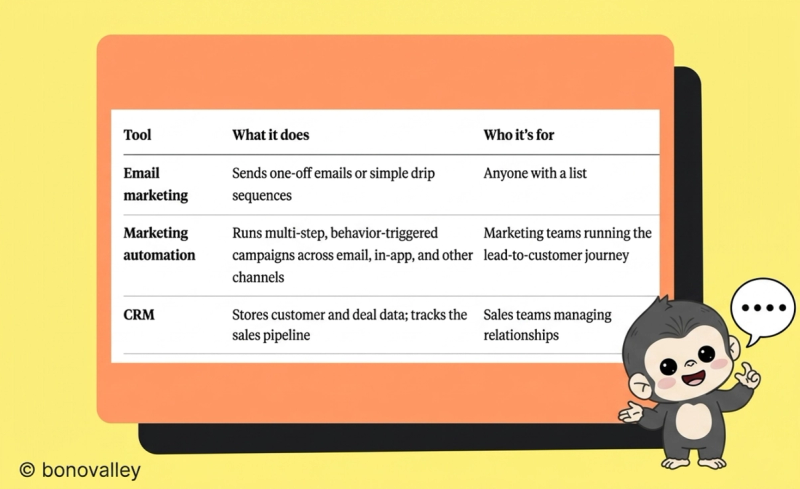
Most SaaS companies use all three. They overlap. They are not the same job.
The simplest way to remember it:
Email is a channel. Your CRM is the system of record. Marketing automation is the engine that decides what to send, when, and to whom.
Confused them before? You're not the first.
Why SaaS is different (and why selling coffee is easier)
A coffee shop sells you a cup. Once.
The moment you walk out the door, the relationship ends.
A SaaS company sells you access. Every single month.
And has to re-earn it every single month.
That changes everything about the marketing job.
In SaaS, the work doesn't end when someone signs up. It starts there.
You help users get value fast. Keep them engaged. Catch them before they leave. And, if you're lucky, convince them to upgrade.
Five things separate SaaS marketing from selling anything else:
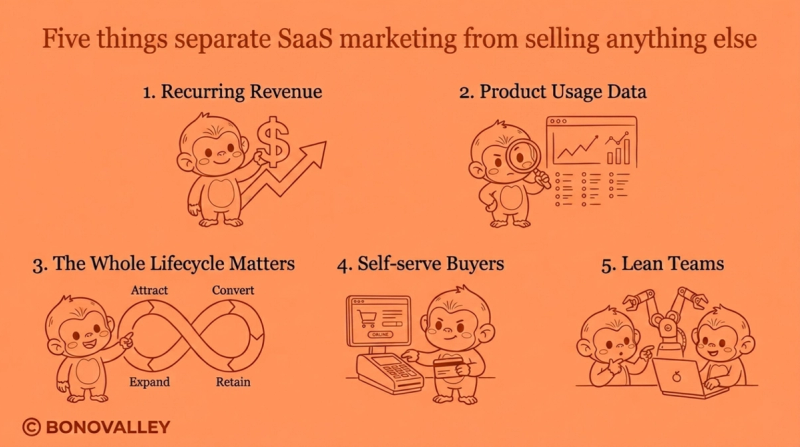
Recurring revenue. A customer paying $50 a month is worth $600 a year. Or thousands over their lifetime. That math changes what's worth automating.
Product usage data. You can see what your users do. Did they log in? Finish setup? Use the key feature? That data is rocket fuel for marketing automation.
The whole lifecycle matters. You're not chasing one purchase. You handle signup, activation, conversion, retention, expansion, and win-back. Six jobs. Not one.
Self-serve buyers. Per Gartner's March 2026 survey, 67% of B2B buyers prefer a rep-free buying experience. They want to figure it out before talking to anyone. Your automation handles the work a salesperson used to do.
Lean teams. Most SaaS companies under 100 employees can't afford a marketer per channel. Automation lets a small team act bigger.
If you sell a subscription to people who research before they talk to you — marketing automation for SaaS isn't a nice-to-have. It runs the business at scale.
How marketing automation works (the three-step shape behind every workflow)
Every automated workflow follows the same simple shape:
Trigger → Condition → Action.
That's it.
- Trigger: something happens. A user signs up. A trial ends in five days. A payment fails. Seven days pass with no login.
- Condition (optional): a check. Did they finish onboarding? Are they on a paid plan? Is this their first inactivity?
- Action: the response. Send an email. Show an in-app message. Notify sales. Move them to a different segment.
Every marketing automation, no matter how complex, builds on these three pieces.
Here's one in action.
Julie signs up for your free trial (trigger). The system checks if she's used the core feature yet (condition). She hasn't. So three days in, she gets a short email pointing her at a 5-minute setup video. Clear. Friendly. One thing to do.
Meanwhile, Tom signed up the same day. He used the core feature on day one. He gets a different email: "What are you trying to build?"
Same product. Same trial week. Two opposite messages.
Because the marketing automation reacted to what each person did.
The benefits of marketing automation for SaaS (the 7 outcomes that matter)
Skip the generic stuff ("save time," "scale personalisation"). Here are the seven outcomes that matter to a SaaS business, paired with the data behind each one where it exists.
1. Faster time-to-value. Most SaaS users decide whether to stay in the first 48 hours. Sometimes the first 48 minutes. Automated onboarding gets them to their "aha moment" while you sleep.
2. Higher trial-to-paid conversion. "Your trial ends Friday" feels like a chore. "You've created 12 projects — let's keep them safe" feels like the product noticed. Behaviour-triggered nudges convert better than time-based drips. Every time.
3. Lower churn. Logins dropping? Plan unused for two weeks? Card about to expire? Marketing automation spots the signal and steps in before the customer decides to leave.
4. Expansion revenue without sales calls. "Your team hit 90% of your plan limit." "You just invited five new users." Both are upgrade moments. Automation catches them. This is where Net Revenue Retention above 100% comes from. And that's the metric your investors fixate on.
5. Recovered revenue you'd otherwise lose. A surprising amount of SaaS churn isn't customers leaving. It's expired credit cards. Automated dunning sequences rescue money that would otherwise vanish.
6. Scaled personalisation without scaled headcount. You can't write to every user. Marketing automation lets you behave as if you did.
7. Sales-marketing alignment that skips the meeting. When automation hands a sales-ready user to a salesperson. With the full context of what they did and when, the conversation starts in the middle, not from scratch.
9 marketing automation examples for SaaS (with the trigger, the message, and the metric)
Welcome emails. Abandoned carts. Birthday discounts.
Every other article hands you the same five marketing automation examples — and none of them helps a SaaS founder.
Here are nine that work.
1. The welcome and onboarding sequence
Trigger: new signup.
What happens: a 3-to-5 email sequence over the first week. Welcome. Set expectations. One feature at a time. Point at support.
Why it matters: sets the tone. Gets users to the first useful moment fast.
Metric to watch: activation rate, time-to-first-value.
The single highest-leverage marketing automation in SaaS. Don't skip it.
2. The activation nudge
Trigger: user signed up but hasn't done the action that predicts retention.
What happens: a short, specific message about that one thing. A 2-minute video. A done-for-you template.
Why it matters: users who activate stay. Users who don't, churn. Simple as that.
Metric to watch: % of trials that hit the activation milestone.
Every SaaS has an "aha moment." Inviting a teammate. Connecting a data source. Creating the first project. Find yours. Build the automation around it.
3. The trial-to-paid push
Trigger: trial ends in 5 days.
What happens: behaviour-aware messages. Heavy users get "you've built something real here, let's keep it." Light users get "looks like you didn't get a chance to set this up — want a hand?"
Why it matters: the difference between 5% and 15% trial conversion separates a struggling SaaS from a thriving one.
Metric to watch: trial-to-paid conversion %.
This automation alone justifies everything else you'll build.
4. The slow-burn lead nurture
Trigger: someone downloads a guide, joins a webinar, or subscribes, but doesn't start a trial.
What happens: a slow drip over 4–8 weeks. Stories. Use cases. Quiet reminders you exist.
Why it matters: most people aren't ready to buy the day they meet you.
Metric to watch: MQL-to-SQL conversion rate.
Don't pressure them. Drip helpful, well-spaced content. When they're ready, they'll come back. Because you stayed useful instead of nagging.
5. Lead scoring and segmentation
Trigger: any user activity.
What happens: every action — email open, feature used, pricing-page visit — adds or subtracts points. Hit a threshold? Sales gets a heads-up. Different segment? Different message stream.
Why it matters: stops you (and your sales team) from treating every lead the same.
Metric to watch: SQL quality (sales acceptance rate).
This is where lifecycle marketing earns its keep.
6. The failed-payment rescue
Trigger: payment fails on renewal.
What happens: three or four emails spread over 14 days. Update the card. Retry the charge. Sometimes let them downgrade instead of churn.
Why it matters: most failed payments are expired cards, not deliberate churn.
Metric to watch: recovered revenue %.
This rescues revenue you didn't know was leaking.
7. The churn warning (and the win-back)
Trigger: your active users’ logins crash. Or they cancel outright.
What happens: for declining users, a "we noticed you haven't been around" message + an offer to help. For cancelled users, a 30-day and 90-day sequence showing what's changed.
Why it matters: the cheapest customer to win is the one teetering on the edge.
Metrics to watch: churn rate, save rate.
8. The expansion trigger
Trigger: team admin invites 5 new users. Or usage hits 80% of plan limit. Or a high-value feature gets used.
What happens: an upgrade offer. Now. Not next quarter.
Why it matters: this is where NRR > 100% comes from.
Metric to watch: Net Revenue Retention, expansion MRR.
Automatable end-to-end. And underused.
9. The feedback loop
Trigger: user hits a milestone (30 days in, 10th project, 100th action).
What happens: a short NPS or feedback survey. Low score? Trigger a help message. High score? Ask for a review.
Why it matters: quiet users churn. Engaged users become advocates.
Metric to watch: NPS, review velocity.
You don't need all nine on day one. Start with one. Get it working. Move to the next.
One more thing. All nine fit product-led growth (PLG) SaaS, where users sign up and try the product before ever talking to sales. PLG demands that the product itself does the heavy lifting. Marketing automation is the layer that whispers in the user's ear at the right moment. Without it? Most trial users drift away in silence.
The features to look for in a marketing automation tool
Eight building blocks. That's it.
- Visual workflow builder — drag-and-drop, no code
- Behavioural triggers — react to in-product events, not only to email opens
- Segmentation — group users by behaviour, plan, or attribute
- Lead scoring — ranks leads based on what they do
- Multi-channel messaging — email, in-app, SMS, push
- CRM and product-data integrations — connect to where your real data lives
- Analytics and reporting — see what's working, not only what's sending
- A/B testing — try two versions, keep the winner
If a tool has these eight? It handles what you need.
The differences show up in how good each one is. The visual builder and the behavioural triggers are where cheap tools fall apart.
How much does marketing automation cost? (the real numbers)
This is the question every beginner asks. And no article answers straight.
So here are the real ranges.
- Free tier: $0. Mailchimp, HubSpot, and Brevo all offer one. Capped at 500–2,000 contacts. Missing the advanced features.
- Starter: $15–$100/month. Entry-level paid plans. Fine for under 1,000 contacts and basic automations.
- Growth: $200–$1,000/month. What most growing SaaS companies pay. Proper automation, segmentation, integrations, 5,000–25,000 contacts.
- Enterprise: $1,000–$10,000+/month. Marketo, Salesforce Marketing Cloud, Eloqua. Annual contracts. Negotiated.
The hidden costs nobody warns you about:
- Setup or onboarding fees. $0 to $10,000+. HubSpot lists a $3,000 Professional onboarding fee on its own pricing page. Sometimes negotiable. Sometimes not.
- Annual contracts. Most paid tools demand them.
- Contact-based pricing. Your list grows. So does your bill.
- Implementation time. No one in-house? Expect 2–6 weeks of setup work.
On ROI: Nucleus Research's review found marketing automation pays back in under six months on average. That's the average. Yours hinges on how well you implement.
Skip the implementation and the math gets ugly fast.
Marketing automation metrics for SaaS (the 4 numbers to watch)
Generic marketing metrics, such as open rates and click rates, tell you nothing about whether your marketing automation is working.
SaaS metrics tell you whether your business is.
Pair every automation with a metric. Like this:
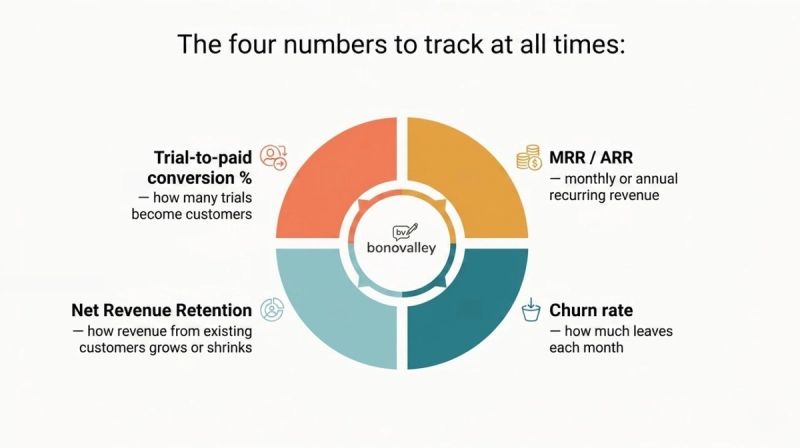
The four numbers to track at all times:
- Trial-to-paid conversion % — how many trials become customers
- MRR / ARR — monthly or annual recurring revenue
- Net Revenue Retention — how revenue from existing customers grows or shrinks
- Churn rate — how much leaves each month
If your automation isn't moving any of these? It isn't working.
No matter how good the open rates look.
How to get started with marketing automation for SaaS (without losing your weekend)
You don't need to do everything at once.
You don't need to do half of it.
Start here:
Before you buy a tool, check:
- [ ] You pull at least 50–100 leads or trial signups per month (otherwise it's overkill)
- [ ] Your data passes a basic clean test (emails captured, basic source tracking working)
- [ ] You can name your lifecycle stages
- [ ] You have content to send — or a plan to write it
- [ ] One person owns this. Not "the team." One person.
First 30 days:
- Map your customer lifecycle on one page: visitor → lead → trial → paid → expansion or churn.
- Pick ONE workflow. Start with onboarding.
- Write the messages.
- Build the automation. Test it on yourself. Ship it.
- Measure the metric tied to that workflow.
Next 30 days: Add a second workflow. Trial-to-paid, or churn warning, or lead nurture. Set up basic lead scoring. Connect your CRM if you haven't.
Next 30 days: Add segmentation. A/B test your highest-volume message. Review what's working. Kill what isn't.
The single biggest mistake here?
Trying to build all nine workflows on day one.
Pick one. Ship it. Learn. Add the next.
That's the secret.
Common marketing automation mistakes (the ones you'll trip on)
The same mistakes hit SaaS teams over and over. Save yourself the trouble.
Set-and-forget. You built the workflow six months ago. The product has changed three times since. The messages haven't. Your automation lies to users now.
Over-automation. Three emails in the first 24 hours? You're spam. Two more in the next 48? You're banned.
No exit criteria. A user converted to paid. Your "nurture trial users" sequence keeps sending. They wonder if you noticed.
Ignoring post-signup. Most SaaS companies obsess over getting signups, then go silent. That's where churn happens. Pour your effort after the signup. Not before.
Bad data in, bad automation out. Your CRM is full of duplicates and missing fields? So is your automation. Clean the data first.
Personalisation that isn't. "Hi {{FirstName}}" with an empty field beats no greeting? No. It hurts more. Test edge cases. Middle names. Accents. The weird ones.
No measurement. If you can't tell what an automation contributed, you can't improve it. Or defend it. Or know when to kill it.
One discipline fixes most of these.
Every quarter: audit your automations. Anything not earning its keep? Turn it off.
Brutal? Yes.
Necessary? Also yes.
Frequently Asked Questions
What is marketing automation for SaaS?
Software that runs your customer messages based on what users do inside your product. For SaaS, it means automating the full subscription lifecycle — signup, onboarding, trial conversion, retention, expansion — not just sending emails.
How does marketing automation for SaaS differ from regular marketing automation?
Regular marketing automation focuses on one-time purchases and lead nurturing. SaaS marketing automation is built around recurring revenue. It prioritises trial-to-paid conversion, activation, retention, and lifetime value. And it fires on in-product behaviour, not just email opens.
What's the difference between marketing automation and a CRM?
Marketing automation runs and personalises campaigns (top to middle of the funnel). A CRM stores customer and deal data and manages the sales pipeline (middle to bottom). Most SaaS companies use both, integrated.
What are the benefits of marketing automation for SaaS?
Saves time, scales personalisation, speeds time-to-value, lifts trial-to-paid conversion, reduces churn, drives expansion revenue, and lets lean teams grow without adding headcount.
What are some marketing automation examples for SaaS?
Welcome and onboarding sequences, activation nudges, trial-to-paid reminders, failed-payment dunning, churn warnings, win-back sequences, expansion triggers, and lead scoring with segmentation.
How much does marketing automation cost?
Free tiers start at $0. Small-team paid plans start at $15–$100/month. Growing SaaS companies spend $200–$1,000/month. Enterprise tools run $1,000–$10,000+/month, with setup fees that can hit $1,000 to $10,000.
How long until I see ROI?
Nucleus Research found average payback under six months across 16 case studies. Yours hinges on implementation. Expect 3–6 months for real impact. Longer if you're starting from scratch.
Can marketing automation reduce churn?
Yes. It catches early warning signs (declining logins, expiring trials, failed payments) and fires re-engagement before the customer decides to leave.
Does marketing automation work for product-led growth (PLG)?
Yes. PLG depends on self-serve users hitting their "aha moment" fast. Automation fires onboarding, in-app tips, and upgrade nudges based on real product usage. It does the work a salesperson would do in a sales-led motion.
What's the minimum company size that justifies marketing automation?
Around 50–100 leads or trial signups per month sets a reasonable floor. Below that? Do it by hand. Above that, you bleed leads and revenue you'd otherwise keep.
The bottom line
Remember the 50 trials at the top of this article? Six still active, the rest gone in silence?
Marketing automation for SaaS isn't about sending more emails. It's about catching those 44 people at the exact moment they needed help, not three days later, when they're gone.
You don't need a giant stack. You don't need a Marketo certification. You don't need to build all nine workflows by Friday.
You need one workflow.
Tied to one SaaS metric that matters.
Working well.
Then the next one.
The companies that grow without burning out their teams aren't the ones with the biggest marketing stacks.
They're the ones whose automation absorbs the work nobody has time for. And steps aside when a human is needed.