

You’ve taken the plunge and signed up for the tool. Maybe even two.
Now, you find yourself staring at the "create workflow" button, completely unsure of what to do next.
Should you go for a welcome series? An onboarding sequence? Perhaps a lead nurture campaign or a win-back strategy?
Where do you even begin? Which option is the most important? What happens if you make the wrong choice?
This guide is here to help you tackle all those questions.
By the time you finish reading, you’ll have a solid understanding of:
- What is a marketing automation workflow
- Which one to kick off first
- How to build it step by step
- What to do if things go awry.
No sales pitches. No overwhelming list of eleven workflows that you’ll just skim over and forget.
Just one well-crafted workflow that you can get up and running this week.
Let's go.
What is a marketing automation workflow?
Imagine the journey a customer takes, starting from "who are you?" to "I can't wait to read your emails!"
A workflow outlines that journey. You get to decide what happens at each stage. The software handles the details.
When someone signs up for your list, that's the starting point. The system checks if they've already made a purchase. That's the condition.
It sends out a welcome email. That's the action. Three days later, it delivers the next one. That's the timing.
Four components. That's the entire process. You don’t have to write the welcome email five hundred times. You craft it once, and the workflow sends it out five hundred times while you catch some sleep.
The 4 building blocks of every workflow
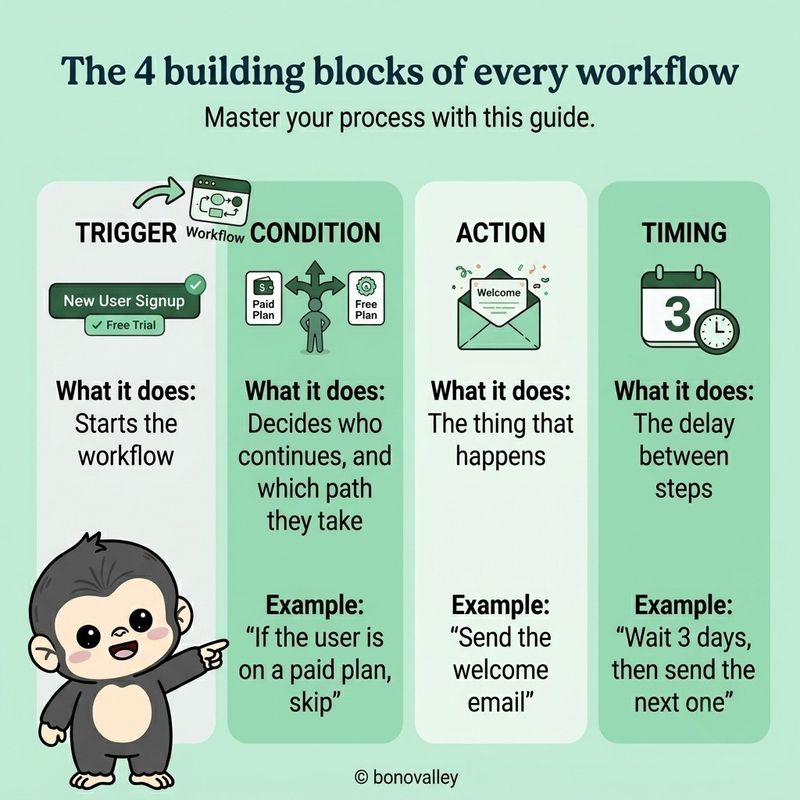
Every marketing automation workflow you'll build, a single welcome email or a fifty-step onboarding sequence, clicks together from these four pieces.
Triggers, conditions, actions, timing. The same four words drive a drip campaign, a behavioural trigger, a lifecycle nudge.
Learn them once. Reuse them forever.
How to create a marketing automation workflow (a 5-question framework for beginners)
The biggest hurdle for most beginners isn’t the software itself; it’s the decision-making process.
Every guide throws a bunch of workflows at you that you "should" create, but none really tells you which one to tackle first.
So, let’s break it down with five key questions.
1. Where does your funnel leak the most?
Are visitors coming in but not signing up? → Time to create a lead-magnet workflow.
Are people signing up and then disappearing? → You’ll want a welcome and onboarding workflow.
Are trials starting but then going cold? → An activation workflow is what you need.
Do customers make a purchase and then drift away? → A re-engagement workflow is in order.
Are leads stalling halfway through a lengthy sales cycle? → Build a lead-nurturing workflow.
2. What content do you already have?
If you’ve got a solid welcome message but no nurturing content, don’t start with nurturing. Begin with what you’ve already written. It’ll help you get things out the door faster.
3. Which one requires the least judgment?
A welcome series is based on straightforward rules. In contrast, a churn-prediction flow demands data, segmentation, and precise copy. Start with the one where the rules practically write themselves.
4. Which one can you test on yourself?
If you can sign up as a fake user and observe the workflow in action, you can troubleshoot it. Choose the one that allows you to be the first user.
5. Which one impacts a metric you track?
Don’t create a workflow just because it sounds smart. Focus on building one that improves a key business metric, such as signups, activations, conversions, or revenue.
For most people, the go-to answer is to kick things off with a welcome sequence. It’s the most effective automation for the least amount of effort. It runs continuously, gaining momentum with every new signup, and most businesses already have the content for it.
5 marketing automation workflow examples you can copy
Here are five worked marketing automation workflow examples. Each one shows the trigger, the conditions, the actions, the timing, and a slice of the message.
Lift them. Adapt the words. Build the flow. Ship.
Example 1: The welcome email automation workflow
Best for: anyone collecting email signups who isn't following up.
Trigger: a new subscriber joins your list. Condition: check they're not already a customer. Actions:
- Email 1 — right away. "Welcome. Here's what to expect."
- Email 2 — Day 3. "Here's the one thing most people miss."
- Email 3 — Day 7. "If you read one thing I've written, read this."
Sample copy for Email 1:
Subject: You're in. Hi {First Name}, Thanks for subscribing. Quick thing before I disappear into your inbox: You'll hear from me every other Tuesday. One idea. No fluff. Easy to leave if you change your mind. Got a question about [your topic]? Hit reply. I read everything. Talk soon, [Your name]
Why it works: it sets the relationship, manages expectations, and invites a reply on day one.
Example 2: Lead-magnet delivery
Best for: anyone with a downloadable guide, checklist, or template behind an email opt-in.
Trigger: a form submission on the lead-magnet page. Condition: confirm the email is valid. Actions:
- Email 1 — right away. Delivers the asset (link or attachment).
- Email 2 — Day 2. "Did you get to read it? Here's the chapter people skip."
- Email 3 — Day 7. "Here's how to apply this to your own [situation]."
Sample copy for Email 1:
Subject: Your [Guide Name] is here Hi {First Name}, Here's your copy: [link]. Short on time? Skip to page 4 — that's where the instructions start. Let me know how you get on, [Your name]
Why it works: it delivers what you promised, points to the highest-value section, and opens a conversation.
Example 3: SaaS onboarding / activation sequence
Best for: any SaaS with a free trial or freemium signup.
Trigger: a new trial signup. Condition: check whether they've hit the "aha moment" action — invited a teammate, connected a data source, created their first project. Actions:
- Email 1 — right away. "Welcome. Here's the 90-second setup video."
- Email 2 — Day 1. Not activated: "Most people get stuck here. This 2-minute clip shows the fix." Activated: "You're in. Here's the next thing to try."
- Email 3 — Day 3. Still stuck: "Want me to set it up for you? Hit reply."
- Email 4 — Day 5. "A few days in. Here's a customer who built [outcome] in their first week."
- Email 5 — Day 7. "Your trial ends in 7 days. Here's how to keep what you've built."
Why it works: it branches on real product usage. It treats activated users differently from stuck ones. It stops nudging people who already did the thing.
Example 4: Re-engagement / win-back
Best for: anyone with a list that's gone quiet.
Trigger: a subscriber hasn't opened or clicked in 60 days. Condition: they're still subscribed. Actions:
- Email 1 — "Are we still good?"
- Email 2 — Day 4. "Here's the best thing I've written this year. If this doesn't land, I'll stop sending."
- Email 3 — Day 10. "I'm cleaning the list. Click here to stay."
- Remove anyone who doesn't click.
Sample copy for Email 1:
Subject: Still want to hear from me? Hi {First Name}, You haven't opened anything I've sent in a while. Fair enough — inboxes are noisy. Want me to keep going? Hit reply with anything — even just "yes." No reply, no problem. I'll take you off the list in 10 days. — [Your name]
Why it works: it respects the reader, rescues your deliverability, and turns anyone who replies into a stronger subscriber.
Example 5: A simple lead nurturing workflow example
Best for: B2B or considered-purchase products with a longer sales cycle.
Trigger: a lead downloads a piece of content or attends a webinar. Condition: they're not a customer, and they haven't booked a sales call. Actions:
- Email 1 — Day 2. The "problem" email. Why the thing they care about is hard.
- Email 2 — Day 6. The "approach" email. How sharp teams solve it.
- Email 3 — Day 10. A short customer story — 200 words, one specific outcome.
- Email 4 — Day 14. A soft invitation. "Want to chat for 15 minutes? Here's the calendar."
Why it works: it teaches before it pitches. It earns the right to ask for the call.
How to build your first workflow (step by step)
Picked your workflow? Here's the build.
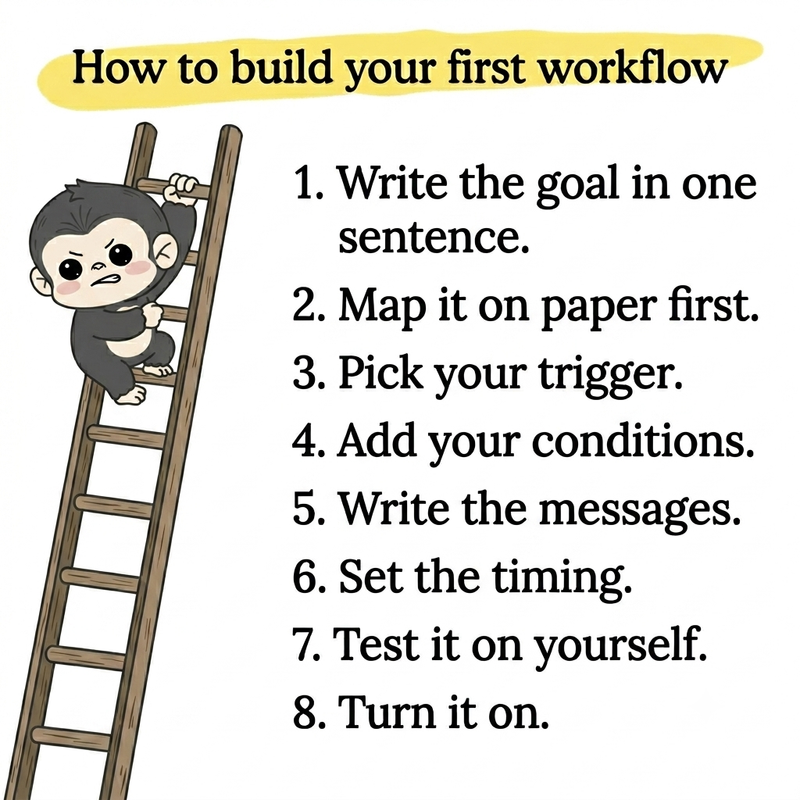
Step 1 — Write the goal in one sentence. "Get every new trial user to invite a teammate in their first week." That's a goal. "Improve onboarding" isn't.
Step 2 — Map it on paper first. Open a doc. Sketch the trigger, the steps, the timing. Don't touch the builder yet. Most failed workflows fail because someone built them before they thought them through.
Step 3 — Pick your trigger. What single event starts this? A signup? A page visit? A tag added? Name it.
Step 4 — Add your conditions. What checks decide who continues, and which path they take? Existing customers skip the welcome. Activated users skip the activation nudge.
Step 5 — Write the messages. This is where beginners spend 80% of their time. Write every email first, in one sitting. Don't draft inside the builder.
Step 6 — Set the timing. Don't default to "send right away." Most workflows should breathe. Day 1, Day 3, Day 7 is a fine rhythm for three emails.
Step 7 — Test it on yourself. Sign up as a fake user. Watch every email arrive. Click links. Confirm the conditions branch the way you drew them.
Step 8 — Turn it on. Don't wait for "perfect." Ship it. Watch the first 50 enrollments. Adjust.
Test before you turn it on (the QA checklist)
The single most common reason a first workflow embarrasses someone in public: nobody tested it.
Before you flip the switch, run this:
- Enroll yourself as a test user
- Every email arrives in order
- All links work
- Merge fields fill in (no "Hi {{FirstName}}" with an empty slot)
- The conditions branch the way you expect
- Existing customers get suppressed when they should
- The timing delays match what you wrote
- You have a way to pull people out of the workflow
- You set the goal in your tool so you can measure success
- Someone other than you read the copy
Ten minutes here saves you a public apology later.
Common first-workflow mistakes
After watching beginners build the same first workflow over and over, the same traps catch them again and again.
Automating a broken manual process. If the process is thin when you do it by hand, automation runs the thin version faster. Fix the process. Then automate.
The Frankenstein workflow. You start with a welcome series. You end with 17 branches, three conditions, and two A/B tests. Cut it. A first workflow fits on one page.
No goal. "Improve onboarding" isn't a goal. "Get users to invite a teammate in week one" is. You can't measure what you can't name.
No owner. "The team will manage it." No, they won't. Pick one person.
Dirty data. Empty merge fields. Wrong tags. Duplicate contacts. Clean the data before you automate, or the automation amplifies the mess.
Over-emailing. Three emails in 24 hours? You're spam. Two more in the next 48? You're banned. Slow down.
Skipping the test. This is the one. Run the checklist above. Every time.
Forgetting an exit. Your "nurture trial users" flow keeps sending after the user upgrades to paid. Now they wonder whether you noticed they paid you. Add suppression rules.
What to measure on your first workflow
Open rates and click rates feel like success. They're vanity.
For a first workflow, track two numbers.
1. Goal conversion rate. Whatever you defined in step 1. If the goal is "get trial users to activate," track activation rate. If the goal is "book a sales call," track calls booked. One number. Tied to the goal.
2. Unsubscribe rate. Your guardrail. If it climbs, your messages run too frequent, too pushy, or too off-topic. Healthy sits under 0.5% per send.
That's it. Two numbers. Watch them for 30 days. Adjust from there.
Neither moves? The workflow isn't broken. The message is. Rewrite the copy before you rebuild the flow.
What to build next
Once your first workflow earns its keep, here's the order most beginners should follow.
Second workflow: the one that feeds the first. Built a welcome series? Build a lead-magnet delivery flow next, it fills the welcome list. Built onboarding? Build a re-engagement flow next, it catches users who fade after activation.
Third workflow: the one tied to revenue. For SaaS, a trial-to-paid conversion sequence. For B2B, a lead nurturing workflow. For e-commerce, an abandoned-cart flow.
Fourth workflow: segmentation and lead scoring. Now you have the data to treat people differently.
You don't need a master plan. Build one. Ship it. Add the next. The compounding starts faster than you think.
Frequently asked questions
What is a marketing automation workflow?
A marketing automation workflow is a series of automated actions triggered by a customer's behaviour or a set condition. It's built from four parts: a trigger (what starts it), conditions (who continues), actions (what happens), and timing (the delays between steps).
How do you create a marketing automation workflow?
Define one measurable goal, map the journey on paper before you touch a builder, pick your trigger, add conditions, write your messages, set the timing, then test the whole thing on yourself before you go live.
Which marketing automation workflow should I build first?
A welcome sequence is the right first workflow for most beginners. It runs on every new signup, compounds forever, needs little segmentation, and most businesses have the content for it already.
What's the difference between a trigger, a condition, and an action?
The trigger starts the workflow (a form submit). Conditions decide who continues and which path they take (if/then logic). Actions are what happens (send an email, add a tag, notify sales). Timing controls the delays between steps.
How long does it take to build a marketing automation workflow?
A simple three-email welcome series, with copy ready, takes 60 to 90 minutes to build and test. A branching onboarding sequence can take a day. Most of the time goes into writing the messages, not configuring the tool.
How do I test a workflow before turning it on?
Enrol yourself or a test contact, confirm each step fires in order, check every link and merge field, verify your conditions branch the right way, and confirm the timing delays match what you wrote. Then run the QA checklist above before you flip the switch.
What should I measure on my first workflow?
Two numbers. The goal conversion rate (the one you defined in step 1) and the unsubscribe rate (your guardrail). Skip open and click rates for the first 30 days, they're vanity for a single workflow.
Do I need a fancy tool to build my first workflow?
No. Any decent email or marketing automation tool like HubSpot, ActiveCampaign, Mailchimp, Kit, Brevo, Customer.io, and many others, builds a simple welcome or onboarding workflow on its entry tier. Pick what you already use. Don't tool-shop until you've shipped one workflow.
The bottom line
The hardest part of your first marketing automation workflow isn't the building. It's the choosing.
You don't need eleven workflows. You don't need a Marketo certification. You don't need a $1,200-a-month tool.
You need one workflow. Tied to one goal. Built well. Tested. Shipped this week.
Most likely: a welcome sequence. Three emails. One trigger. One condition. A handful of delays. Live by Friday.
The compounding starts the moment you turn it on.
Stop reading. Open your tool. Build it.